augmenters.weather
Note
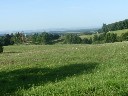
All examples below use the following input image:
FastSnowyLandscape
Convert non-snowy landscapes to snowy ones.
This augmenter expects to get an image that roughly shows a landscape.
API link: FastSnowyLandscape
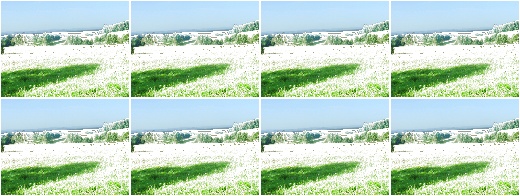
Example.
Search for all pixels in the image with a lightness value in HLS
colorspace of less than 140 and increase their lightness by a factor
of 2.5.
import imgaug.augmenters as iaa
aug = iaa.FastSnowyLandscape(
    lightness_threshold=140,
    lightness_multiplier=2.5
)
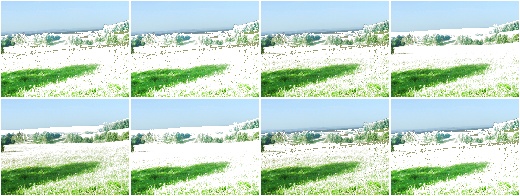
Example.
Search for all pixels in the image with a lightness value in HLS
colorspace of less than 128 or less than 200 (one of these
values is picked per image) and multiply their lightness by a factor
of x with x being sampled from uniform(1.5, 3.5) (once per
image).
aug = iaa.FastSnowyLandscape(
    lightness_threshold=[128, 200],
    lightness_multiplier=(1.5, 3.5)
)
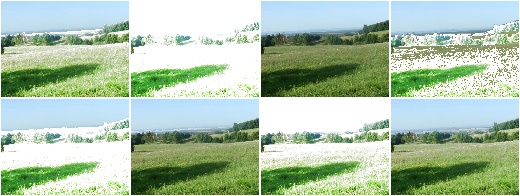
Example.
Similar to the previous example, but the lightness threshold is sampled
from uniform(100, 255) (per image) and the multiplier
from uniform(1.0, 4.0) (per image). This seems to produce good and
varied results.
aug = iaa.FastSnowyLandscape(
    lightness_threshold=(100, 255),
    lightness_multiplier=(1.0, 4.0)
)
Clouds
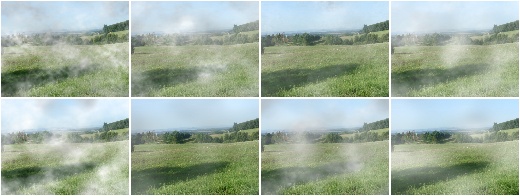
Add clouds to images.
This is a wrapper around CloudLayer. It executes 1 to 2 layers per
image, leading to varying densities and frequency patterns of clouds.
This augmenter seems to be fairly robust w.r.t. the image size. Tested
with 96x128, 192x256 and 960x1280.
API link: Clouds()
Example. Create an augmenter that adds clouds to images:
import imgaug.augmenters as iaa
aug = iaa.Clouds()
Fog
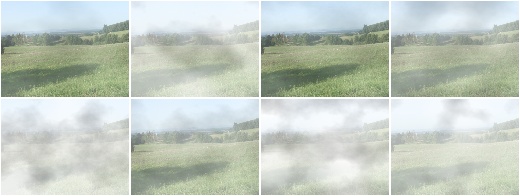
Add fog to images.
This is a wrapper around CloudLayer. It executes a single layer per
image with a configuration leading to fairly dense clouds with
low-frequency patterns.
This augmenter seems to be fairly robust w.r.t. the image size. Tested
with 96x128, 192x256 and 960x1280.
API link: Fog()
Example. Create an augmenter that adds fog to images:
import imgaug.augmenters as iaa
aug = iaa.Fog()
CloudLayer
Add a single layer of clouds to an image.
API link: CloudLayer
Snowflakes
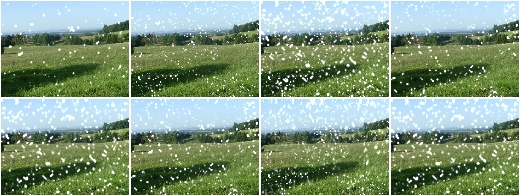
Add falling snowflakes to images.
This is a wrapper around SnowflakesLayer. It executes 1 to 3 layers
per image.
API link: Snowflakes()
Example.
Add snowflakes to small images (around 96x128):
import imgaug.augmenters as iaa
aug = iaa.Snowflakes(flake_size=(0.1, 0.4), speed=(0.01, 0.05))
Example.
Add snowflakes to medium-sized images (around 192x256):
aug = iaa.Snowflakes(flake_size=(0.2, 0.7), speed=(0.007, 0.03))
Example.
Add snowflakes to large images (around 960x1280):
aug = iaa.Snowflakes(flake_size=(0.7, 0.95), speed=(0.001, 0.03))
SnowflakesLayer
Add a single layer of falling snowflakes to images.
API link: SnowflakesLayer
Rain
Add falling snowflakes to images.
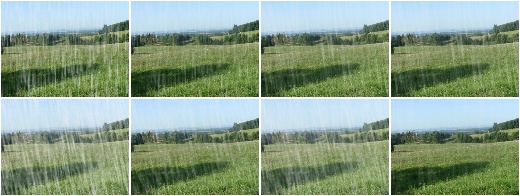
This is a wrapper around
RainLayer. It executes 1 to 3
layers per image.
Note
This augmenter currently seems to work best for medium-sized images
around 192x256. For smaller images, you may want to increase the
speed value to e.g. (0.1, 0.3), otherwise the drops tend to
look like snowflakes. For larger images, you may want to increase
the drop_size to e.g. (0.10, 0.20).
API link: Rain
Example.
Add rain to small images (around 96x128):
import imgaug.augmenters as iaa
aug = iaa.Rain(speed=(0.1, 0.3))
Example.
Add rain to medium sized images (around 192x256):
aug = iaa.Rain()
Example.
Add rain to large images (around 960x1280):
aug = iaa.Rain(drop_size=(0.10, 0.20))
RainLayer
Add a single layer of falling raindrops to images.
API link: RainLayer